Home Premiere Pro captions

Speech to Text built into Premiere, then a caption track

Captions in Premiere Pro: how they work, and a faster route.

Premiere Pro makes captions in two steps: Speech to Text writes a transcript of the sequence, then Create captions from transcript turns it into a caption track you can style, translate and export. It is included in the subscription. Adobe now calls the desktop app simply Adobe Premiere, but the captions work the same way. This page walks through Premiere’s own route, then explains when it is quicker to export the cut and let Titro burn styled, word-timed captions into it.

From €4.99/month
Or work on the web →

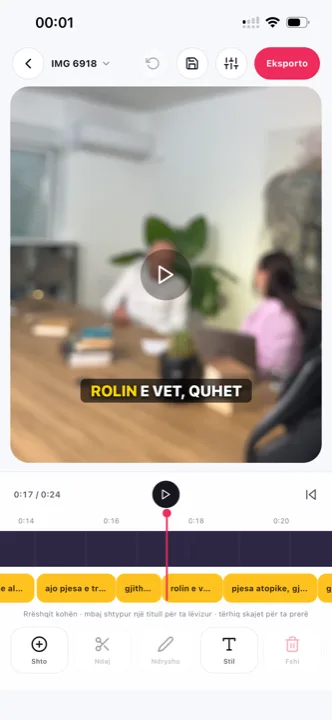
Captions for a Premiere Pro export in Titro: the caption editor on the video
why

How captions work in Premiere Pro.

01 Transcript first, captions second

Premiere does not caption a clip directly. It transcribes the sequence with Speech to Text, and the captions are built from that transcript. You can transcribe as you import, by ticking Automatic Transcription, or later from the Text panel.

02 A caption track you edit like media

The captions land on their own track in the timeline. You trim and move them with the normal editing tools, and the Create captions dialog sets the preset, the style, how long each caption is and whether it runs on one or two lines. A Single Word layout shows one word at a time for social clips.

03 Eighteen languages for the transcript

Adobe’s list for Speech to Text has 18 entries, including English, Spanish, German, French, Italian, Portuguese, Japanese, Korean and Hindi. Albanian and Turkish are not on it. Captions can then be translated into other languages through Adobe’s cloud service, onto a new track.

04 Burned in or a file

When the edit is done, Premiere exports the captions burned into the picture or as an .srt sidecar file, and can embed them in QuickTime or MXF files. Adobe’s own tip is to caption when the edit is finished or nearly finished, because deleted caption segments have to be recreated by hand.

steps

How to add auto captions in Premiere Pro.

01

Open the captions workspace

Choose Window > Workspaces > Captions and Graphics. The Text panel holds the Transcript and Captions tabs.

02

Transcribe the sequence

If the media was not transcribed on import, open the Transcript tab and generate a transcript. Pick the language, choose whether to label speakers, and download the language pack if Premiere asks for one.

03

Create captions from the transcript

In the Captions tab, choose Create captions from transcript. Set the caption preset, style, length and lines, or pick Single Word under Layout, then select Create captions.

04

Fix, style and export

Correct the words the transcript got wrong, style the track in the Properties panel, then export with the captions burned in or as an .srt file.

in practice

Premiere Pro captions and subtitles, in practice.

Where Premiere’s captions take time

The transcript is the slow part to check. Names, brands and anything said over music need a pass, and Premiere’s find and replace in the transcript helps with a name it heard wrong every time. Styling is per track: set the font, colour and position once, then redefine the style so every caption on the track follows it. For a fifteen-second clip that is quick. For a weekly batch of talking videos it is the same routine every time.

When Titro is the better route

If the video is a person talking and it is going to TikTok, Reels or Shorts, finish the cut in Premiere, export it and upload the file to Titro. Titro writes the captions from the speech with every word timed, so the highlight follows the voice, and burns them into the video in one of 15 presets, with 8 fonts, 9 entrance effects and 7 highlight colours. It also captions Albanian and Turkish, which Premiere’s Speech to Text does not list, and sentences that switch between Albanian, English and German. The same project runs in the iPhone and Android app, so the export can go from your desk to your phone and out to the feed.

Keep the captions inside Premiere instead

If you would rather style the captions in Premiere, use Titro for the words and Premiere for the look. Titro Studio downloads an .srt timed to every word, with speaker names when more than one person talks. Import the .srt into the project like any piece of media and drag it into the sequence: Premiere makes a new caption track from it. This is also the route for a 4K master, because Titro’s burned-in export is capped at 1080p. The file itself is explained on the SRT file generator page.

Export quality

Titro keeps the resolution of videos up to 1080p, and a 4K export from Premiere comes back at 1080p. The audio is copied untouched. If you need a lighter file, the export screen can also make a smaller copy, such as 720p. Paid plans export with no Titro mark.

Translating the captions

Premiere translates captions through Adobe’s cloud service onto a new track. In Titro, translation runs between Albanian, English, German, Italian, French and Turkish, in either direction, and you read the result before you export. Translated minutes count double. More on the video subtitle translator page.

What it costs

Speech to Text is part of the Premiere subscription. Titro’s first video is free up to three minutes, with no card and a small Titro mark. After that, Creator is €4.99 a month for 300 minutes, with videos up to 60 minutes each. The other ways to put subtitles on a finished video are on add subtitles to video.


questions

What you should know.

Does Premiere Pro have auto captions?

Yes. Speech to Text transcribes the sequence, and Create captions from transcript turns the transcript into a caption track. It is included in the Premiere subscription.

How do I add subtitles in Premiere Pro?

Switch to the Captions and Graphics workspace, transcribe the sequence in the Text panel, then choose Create captions from transcript in the Captions tab.

Can Premiere Pro make word-by-word captions?

Yes. In the Create Captions dialog, choose Single Word under Layout and each caption holds one word, in sync with the audio.

Which languages does Premiere’s Speech to Text support?

Adobe lists 18, including English, Spanish, German, French, Italian, Portuguese, Japanese, Korean and Hindi. Albanian and Turkish are not on the list.

Can I import an .srt file into Premiere Pro?

Yes. Import it like any media and drag it into the sequence. Premiere creates a caption track from it.

Can Premiere burn captions into the video?

Yes. When you export, the captions can be burned into the picture, written to an .srt sidecar file, or embedded in QuickTime or MXF files.

Why caption a Premiere export in Titro?

For talking videos going to social feeds: word-timed captions with a highlight that follows the voice, styled presets, Albanian and Turkish, and the same project on your phone. Exports are up to 1080p.

also

Subtitles for everywhere you post.

sources

Where these facts come from.

Vendor pricing and help pages first; a third-party source only where the vendor publishes no page. If something has changed, write to support@titroshqip.com and we will correct it.

Try it on your next video.

Upload it now and see it finished before your coffee’s done.

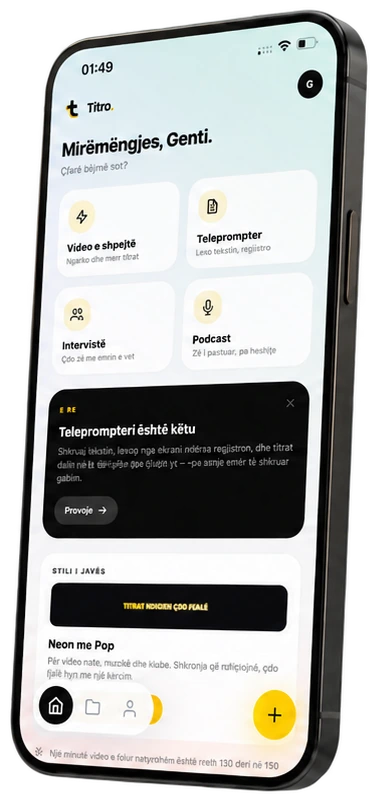
Titro on a phone, showing the home screen and subtitle tools