Home Compare Submagic alternative

60 min per video on the €4.99 plan — Submagic's Starter allows 2

A Submagic alternative that counts minutes, not videos.

If you are searching for a Submagic alternative, it is usually the plan limits: 15 videos a month at two minutes each on Starter, web only. Titro counts minutes, runs natively on iPhone and Android as well as the web, and starts at €4.99.

From €4.99/month · 300 minutes of video · cancel any time
Or work on the web →

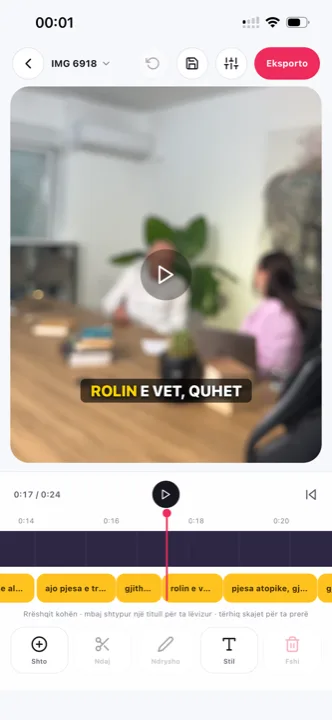
Submagic alternative: word-timed subtitles in the Titro editor
in one paragraph

Submagic and Titro, side by side.

Submagic is a web app for animated captions on short videos: templates, emojis, keyword highlights, b-roll and translation, from $12 a month billed yearly. Titro is a subtitle tool for phone and web that times every word, burns the subtitles in at the original resolution, and translates between English, German and Albanian. Both do the same core job; they differ on price structure, platforms, languages and how much is decoration. The phone-first workflow Submagic lacks is described on the caption app page; the wider field is in the nine-app roundup.

The practical difference is where the work happens. Submagic assumes a desk: a browser tab, a mouse, a project per clip. Titro assumes the video is on the phone that shot it, with the browser studio reserved for the long files. If your clips are born in a camera roll and die in a feed, the number of steps between gallery and posted video is the metric that matters — and it is where the two tools differ most.

the table

Titro vs Submagic: what you actually get.

TitroSubmagic
Made forSubtitles on talking video, phone firstAnimated captions and b-roll on short videos
Runs oniPhone, Android, web (one account)Web only; no native iOS or Android app
Entry price€4.99/month for 300 minutes, or €49/yearStarter $19/month or $12/month billed yearly; Pro $39 or $23; Business $69 or $41
Free tierFirst video free, up to 3 minutes, no cardLimited free plan
WatermarkNone on paid plansNone on paid plans
Export qualityOriginal resolution kept, 4K stays 4K1080p at 30 fps on Starter and Pro; 4K at 60 fps on Business
Caption languages3: English, German, Albanian (Gheg and Tosk), mixed sentences48+ on the official list, including German; Albanian not listed
TimingEvery word timed; highlight follows the spoken wordAnimated caption styles with keyword highlights
TranslationBetween the three languages, one clickYes, AI translation
Subtitle file (.srt)Yes, every plan, with speaker namesYes: SRT, VTT and TXT
Usage limit300 minutes/month, up to 60 minutes per videoStarter 15 videos/month at 2 minutes; Pro 40 at 5 minutes; Business 100 at 30 minutes
Beyond captionsSpeaker names, silence and filler cut, audio cleanup, teleprompterTemplates, emojis, b-roll, zoom effects, magic cuts
choose Submagic when
  • You want emoji and keyword animations and stock b-roll dropped in automatically.
  • You post in one of the 48+ languages Titro doesn't cover.
  • You already work entirely in a desktop browser and never caption on the phone.
choose Titro when
  • Your videos are longer than two minutes, or you make more than fifteen a month.
  • You caption on the phone: pick from the gallery, save back to the gallery.
  • You speak Albanian, or mix English, German and Albanian in one sentence.
  • You want a per-minute price with no video count to watch.
in practice

Three situations where the difference shows.

01 Fifteen isn't enough

A creator posting daily hits Submagic's Starter limit by mid-month. Titro's 300 minutes cover a daily two-minute video with room to spare.

02 The five-minute explainer

Submagic Starter stops at two minutes per video and Pro at five. Titro allows sixty per video on Creator and 180 on Studio.

03 Captioning from the phone

Submagic runs in a browser tab. Titro's apps upload from the camera roll and save the finished video next to the original.

questions

What you should know.

Does Titro have the animated styles Submagic has?

It has eight subtitle styles, eight entrance effects, five fonts, seven highlight colours and free positioning. It does not add emojis or b-roll automatically.

Is Titro cheaper than Submagic?

At the entry level, yes: €4.99 a month against $12 a month billed yearly or $19 monthly. Titro also measures minutes rather than videos, so the comparison depends on how long your videos are.

Can I use Titro on my computer?

Yes. Titro Studio runs in the browser with a layered timeline; the same account works in the iPhone and Android apps.

Does Titro support German?

Yes, along with English and Albanian, including sentences that switch between them.

Does Titro translate subtitles?

Yes, between English, German and Albanian, with one click. Translated minutes count double.

Does Titro count videos like Submagic does?

No — minutes. 300 a month on Creator, up to 60 per video. A daily two-minute clip fits with most of the plan to spare, and there is no per-video length tier to upgrade through. Translation counts double, and that is the only multiplier in the plan.

Which is better for Reels and TikTok?

Both export vertical video with animated captions. The real difference is workflow — phone-native against browser — and the meter, minutes against videos. The feed-specific guidance is on TikTok captions and Reels captions.

Does Titro add emojis or b-roll like Submagic?

No, deliberately. Titro renders the words — timed, styled, positioned — and does not decorate the video. If automatic emojis and stock b-roll are the look you want, Submagic is the better fit, and the table above says so.

Does Submagic have a mobile app?

No — its own help pages say it is browser-based, with no native iOS or Android app. Titro ships both, plus the web studio, on one account. If captioning away from a desk is part of your week, that is the structural difference.

sources

Where these facts come from.

Vendor pricing and help pages first; a third-party source only where the vendor publishes no page. If something has changed, write to support@titroshqip.com and we will correct it.

also compared

Other tools people switch from.

Try it on your next video.

Upload it now and see it finished before your coffee’s done.

Titro on a phone, showing the home screen and subtitle tools