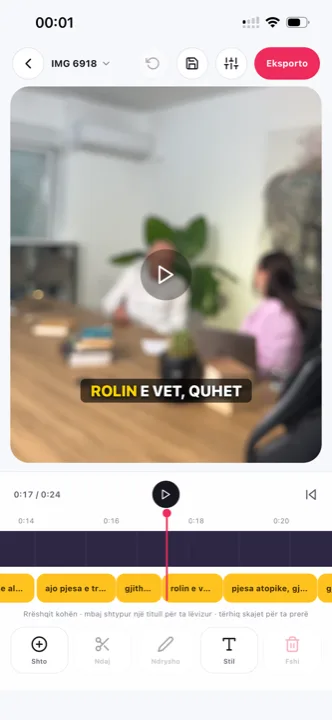
Home Captions for Facebook video
on mute is how Facebook plays video in the feed
Captions for Facebook video decide whether a clip is watched or scrolled past, because Facebook plays feed video on mute by default. Facebook’s own auto-captions help, and they disappear the moment someone shares the clip anywhere else. Here is how to add captions that stay.
From €4.99/month · 300 minutes of video · cancel any time
Or work on the web →
Meta generates captions for uploaded video and Reels, and they belong to the post, not the file. Share to WhatsApp, download for Instagram, forward to a group, and the video is silent text-free again. Burned-in captions travel with the file.
The same video with captions inside goes to a Facebook post, a Facebook Reel, Instagram and TikTok without a second version. Format kept, captions in the safe zone.
Meta’s own placement previews show ads without sound. A video ad with the message burned into the frame is read even by people who never unmute, and it uploads to Ads Manager like any other file.
Choose two or three words per caption and a box or outline style. Titro times every word, so the highlight follows the voice even at a calm pace.
From the phone or in the browser. Horizontal page videos, square posts and vertical Reels all keep their format.
The captions come back timed to every word. Say at upload if more than one person speaks.
Box or Podcast styles read best over bright footage. Tap a word to fix it, drag the caption clear of faces.
Save in original quality and upload as a post, a Reel or an ad. Leave Facebook’s auto-captions off to avoid a double layer.
When you post a video from a Page, open the video settings and enable auto-generated captions; Meta transcribes and lets you edit. For Reels, captions are on by default in many regions and can be edited before posting. They are worth keeping on for accessibility, but not worth relying on for reach, because they do not leave the platform.
Feed video is framed by the post text above and reactions below; Reels cover the bottom of the frame with the interface. The lower-middle band is safe on both. Titro’s styles start there, and any caption can be dragged. The same calculus for the other feeds is on TikTok captions and Reels captions; the numbers behind muted feeds are on why subtitles matter.
A Page speaking to Kosovo and to the diaspora in Germany posts the same video twice, once with Albanian captions and once with German. Titro translates with one click; translated minutes count double. The Albanian specifics — Gheg, Tosk, sentences that mix in English — are on Albanian subtitles.
The same Page publishes in three shapes. Feed video is often square or horizontal, framed by the post text above and the reactions below; Reels are vertical with the interface stacked along the bottom; Stories are vertical with interface at both ends. One Titro project serves all three, because the format you upload is the format you get back — but check the caption position per shape before you post. The lower-middle band that is safe in the feed sits a touch low for Stories, where lifting the caption slightly clears the reply box. Dragging it takes seconds, and it is the difference between a post that was made for the placement and one that was dumped into it.
Ads are where captions stop being optional. Meta previews placements muted, and an ad that needs sound to make its point pays for impressions it cannot use. The Titro export is a standard video file at the original resolution, so it goes into Ads Manager like any other creative, with the message already in the frame. Keep the text clear of the bottom edge in vertical placements, where ad interface overlays sit, and lead with the claim in the first caption on screen. For a campaign split between markets, the same creative re-exports with the second language’s subtitles in one click from the same project.

Yes. The export is a normal video with the captions inside, in original quality.
Facebook accepts caption files, but they stay behind on reposts. Burned-in captions are the safe choice for reach; keep the .srt for YouTube.
Up to 60 minutes per video on Creator and 180 on Studio. Use Titro Studio in the browser for long files.
Yes. Choose “more than one voice” at upload and each speaker gets a name and colour.
From €4.99 a month for 300 minutes of video. The first video is free up to three minutes.
Facebook ranks on watch behaviour, and feed video plays muted by default. A video that reads without sound holds viewers who would otherwise scroll on — the ranking effect is indirect, but retention is the signal that drives it.
Not in place — Facebook does not let you swap the file on an existing post. Download the original, caption it in Titro, and publish the captioned version as a new post or as the ad variant, leaving the old post’s engagement where it is. The captioned file also serves Instagram and WhatsApp unchanged.
Upload it now and see it finished before your coffee’s done.