Home Best auto subtitle apps

9 tools prices and language lists checked 30 Sep 2026

The best auto subtitle apps in 2026, compared honestly.

The best auto subtitle apps all do the same first step, listening to your video and writing the words. They differ on what you pay, where they run, which languages they actually handle, and how many limits hide under the headline price. We make Titro, so read our entry with that in mind; the others are described from their own pricing and help pages.

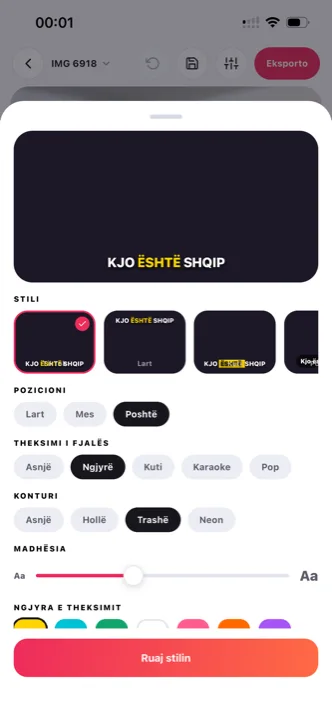
best auto subtitle apps: subtitle styles in Titro
how we compared

Five things that decide which auto subtitle app is best for you.

01

Price structure

Minutes, videos or credits? A per-video cap of two minutes changes what a plan is worth.

02

Where it runs

Native phone apps matter if you shoot on the phone. Half of these tools are browser only.

03

Languages that work

Marketing counts and official lists differ. We link the official list where one exists.

04

Word timing

Subtitles that highlight the word being spoken hold viewers; line-at-a-time captions don't.

05

What's hidden

Watermarks, fair-use caps, credits that burn on failed edits, projects that expire.

the nine

The best auto subtitle apps, one by one.

01 Titro

Our tool. Subtitles timed to every word in English, German and Albanian, including mixed sentences; iPhone, Android and web on one account; speaker names, silence cut, teleprompter, .srt on every plan.

Best for
Talking video posted daily, bilingual accounts, Albanian speakers.
Price
€4.99/month for 300 minutes; first video free up to 3 minutes.
Watch out
Three languages only. No multitrack editing, no stock media, no dubbing. Titro →

02 CapCut

A full free editor with auto captions as one feature. Word-by-word highlight, SRT export on desktop, runs everywhere.

Best for
People who edit heavily and want one app for everything.
Price
Free editor; no public pricing page, App Store shows about $9.99–$19.99/month.
Watch out
Auto captions hit an undocumented cap on the free tier, then ask for Pro. No official language list. Full comparison →

03 Submagic

Animated captions with emojis, keyword highlights and automatic b-roll, in the browser.

Best for
Short-form creators who want the loud, animated look.
Price
From $12/month billed yearly (Starter, 15 videos of 2 minutes).
Watch out
Web only. Video count and per-video length limits on every tier. Full comparison →

04 Captions (Mirage)

Captions plus AI dubbing, lip sync and avatars on iOS, Android and web; 99 languages.

Best for
Creators who want AI video features beyond subtitles.
Price
Basic $9.99/month for 200 credits.
Watch out
Credits, not minutes; AI features consume them whether or not you keep the result. Full comparison →

05 VEED

A full online editor with subtitles, translation, dubbing and stock media; the official language list includes Albanian.

Best for
Teams that edit in the browser and need many languages.
Price
Lite about $12/month billed yearly.
Watch out
Free tier is 720p with a watermark. Android app still on a waitlist. Full comparison →

06 Zubtitle

Simple web tool for captioned social clips with headlines and resizing; karaoke-style word animation; .srt on all plans.

Best for
Solo creators who want the simplest possible flow on a computer.
Price
Guru $19/month or $190/year (10 videos/month).
Watch out
No translation at all. Uploads capped at 20 minutes. Web only.

07 Kapwing

Browser editor with strong subtitles: 155 language variants including Albanian and German, word-by-word animation, 1,000 subtitle minutes a month on Pro.

Best for
Desk-based editors who need lots of languages and a generous subtitle quota.
Price
Pro $16/month billed annually.
Watch out
Browser only; the Android app was discontinued. Free tier exports are watermarked, 720p and deleted after three days.

08 Descript

Text-based editor for podcasts and long video; edit the video by editing the transcript; active-word caption styling.

Best for
Podcasters and long-form editors on a desktop.
Price
Hobbyist $16/month billed annually (10 hours).
Watch out
26 transcription languages, Latin alphabet only. No Android; iOS app records only. Full comparison →

09 OpusClip

Turns long videos into short clips with virality scoring and karaoke captions; web, iOS and Android.

Best for
Repurposing long recordings into many shorts.
Price
Starter $15/month (150 credits).
Watch out
Credits are charged on source minutes, not on clips you keep. Subtitle download is Pro only. Free clips expire after three days. Full comparison →
questions

What you should know.

What is the best auto subtitle app for iPhone?

For subtitles alone, Titro or Captions; both run natively on iPhone and Android. CapCut if you also edit. VEED has an iPhone app; Submagic, Kapwing, Zubtitle and Descript are browser tools. What a phone-first caption workflow looks like in practice is on the caption app page.

Which auto subtitle app is free?

CapCut's editor is free with a cap on auto captions. VEED, Kapwing and Zubtitle have free tiers with watermarks and low resolution. Titro's first video is free up to three minutes with no card.

Which apps support Albanian subtitles?

Titro, VEED and Kapwing list Albanian officially. Titro is the one built around Gheg, Tosk and mixed Albanian-English speech — the detail is on Albanian subtitles. Submagic, Captions, Zubtitle, Descript and OpusClip do not list Albanian.

Which apps time subtitles to each word?

Titro, CapCut, Zubtitle, Kapwing, Descript and OpusClip document word-level highlighting. Submagic, Captions and VEED market animated caption styles; we did not confirm per-word timing from their documentation.

How did you check these facts?

From each tool's pricing and help pages on 30 September 2026, with third-party sources only where a vendor publishes no pricing page. Sources are listed at the bottom. Tell us if something changed and we will correct it.

sources

Where these facts come from.

Vendor pricing and help pages first; a third-party source only where the vendor publishes no page. If something has changed, write to support@titroshqip.com and we will correct it.

head to head

Titro against each one.

Try it on your next video.

Upload it now and see it finished before your coffee’s done.

Titro on a phone, showing the home screen and subtitle tools

