Home Add subtitles to a video

4 steps no editing software, no transcript

How to add subtitles to a video without typing them.

To add subtitles to a video you used to need an editing suite, a transcript and a free afternoon. Now you need the video and about twenty seconds.

From €4.99/month
Or work on the web →

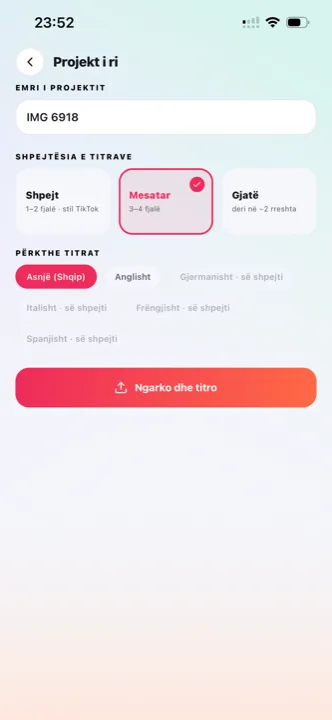
Add subtitles to a video: the upload screen in the Titro app
why

Three ways to add subtitles to a video — and which one to use.

01 Burned-in subtitles (open captions)

The text is rendered into the picture and travels with the file. Right for TikTok, Reels, Shorts, Stories and ads — anywhere the platform’s own captions can be switched off, lost on repost, or simply don’t exist. This is what Titro makes by default.

02 A subtitle file (closed captions)

An .srt or .vtt file sits next to the video and the player shows it on demand. Right for YouTube long-form, courses and anything a viewer might want to switch off or read in another language. Titro exports .srt from every project.

03 The platform’s auto-captions

TikTok, Instagram and YouTube all generate captions. They are free and they are a starting point — but they are often wrong on names, worse in any language but English, and they don’t leave the platform with the video.

04 What most people actually want

Burned-in subtitles for the short clip, an .srt for the long version. One upload to Titro gives you both, from the same timed transcript, without doing the work twice.

steps

How to add subtitles to a video with Titro.

01

Upload the video

On iPhone or Android from the gallery, or drag it into Titro Studio in the browser. Vertical, horizontal or square — the format stays as it is, no cropping and no black bars.

02

Choose your options

How many words at once (two or three reads best on a phone), whether the audio needs cleanup, whether more than one person speaks, and whether you want a translation.

03

Read and adjust

Titro returns the subtitles timed to each word. Tap to fix a word, drag a caption out of the way of a face, split a line that runs long, pick a style.

04

Export

A finished video in the original quality with the subtitles inside — and the .srt if you need it. Save to your phone or download, then post.

in practice

What to know before you add subtitles to a video.

Where to put the subtitles in the frame

Every feed covers part of the picture with its own interface. TikTok fills the bottom right with the description and icons; Instagram covers roughly the bottom 15%; Shorts adds a column of buttons on the right. The safe area on all three is the lower-middle band, above the description. Titro’s styles start there, and any caption can be dragged elsewhere when the shot needs it. The platform-by-platform detail is on TikTok captions, Reels captions and Shorts captions.

How many words per line

On a phone screen, two or three words at a time read faster and hide less of the picture. Long lines look like a film subtitle and slow the video down. Choose the line length at upload; you can still split and merge lines afterwards.

Fonts, size and contrast

Bold sans-serif fonts with a box or a thick outline survive bright, busy footage; thin text on a sunny beach does not. Titro renders every caption in the editor exactly as it will be burned, so what you see on the timeline is what the viewer gets.

Doing it on the platform instead

Every platform will also caption for you, and for a one-off post that can be enough. The trade-offs — captions that disappear on repost, weak accuracy outside English — are walked through for TikTok on how to add captions on TikTok and for Facebook on captions for Facebook video. If you caption inside CapCut today, the usage cap free accounts report and the common failures are covered on CapCut auto captions. And if you are deciding whether the work is worth doing at all, the argument — muted feeds, retention, search — is laid out on why subtitles matter.

Subtitles in a second language

Titro listens in English, German and Albanian — including Gheg and Tosk Albanian — and handles sentences that switch language halfway through. If part of the audience speaks another of the three, translate the subtitles with one click and export a second version; translated minutes count double. For a longer recording where the transcript itself is the point, start from transcribe video to text — the same project yields the subtitles, the translation and the .srt file.

A thirty-second check before you export

Read the subtitles through once, out loud if the video matters — names, numbers and brand terms are where recognition slips, and each fix is a tap. Scrub to the busiest shot and check the caption still clears faces, logos and the platform’s interface; drag it if not. If the footage is bright or high-contrast, switch to a boxed style rather than shrinking the text. And check the first caption on screen: it should be a sentence worth staying for, because most viewers meet it with the sound off. The whole pass takes less time than the upload did, and it is the difference between subtitles that read as part of the video and subtitles that read as something a tool added.


questions

What you should know.

Can I add subtitles to a video on my iPhone?

Yes. Upload from the gallery in the Titro app, edit by touch, and save the finished video back to the gallery. The same on Android.

Does it change the video quality?

No. The original resolution is preserved — 4K stays 4K — and the audio is untouched. Only the subtitles are added.

Can I add subtitles in another language than the one spoken?

Yes. Titro translates the subtitles between English, German and Albanian with one click. Translated minutes count double.

Do I need to know how to edit video?

No. Upload, wait, pick a style, export. The editor is there when you want to change something, not because you have to.

Can I add subtitles to a long video?

Up to 60 minutes per video on Creator, 180 on Studio. For a podcast or a lecture, use Titro Studio on the web — bigger screen, faster upload.

also

Subtitles for everywhere you post.

Try it on your next video.

Upload it now and see it finished before your coffee’s done.

Titro on a phone, showing the home screen and subtitle tools