Home TikTok captions

9:16 vertical, uncropped, original quality

TikTok captions, burned in.

TikTok captions aren’t decoration. Most people scroll with the sound off, and a video without them is talking to an empty room.

From €4.99/month · 300 minutes of video · cancel any time
Or work on the web →

TikTok captions in the TikTok style, burned onto a vertical video in Titro
why

Why TikTok captions are made with Titro.

01 TikTok’s captions don’t travel with the video

TikTok has its own auto-captions, but they belong to the platform, not the clip. Download the video, repost it to Reels, forward it in a chat, and they vanish. Titro burns the subtitles into the frame, so the video reads the same wherever it goes.

02 Word by word, not line by line

Captions that jump a sentence at a time make the viewer read ahead of the voice. Titro times every word, so the highlight falls on the word being said — the style the biggest accounts use, and the reason their videos hold to the end.

03 The TikTok style, tuned for the feed

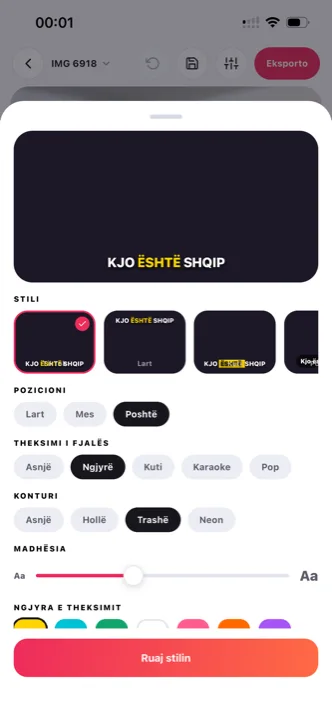
Big letters, a colour highlight on the active word, sitting in the lower-middle band where TikTok’s own interface doesn’t reach. Or any of the other seven styles, with fonts, colours and position in your hands.

04 Done on the phone the video is on

Pick the clip from your gallery, wait, tweak what you like, save back to the gallery. No transfer to a laptop, no editing suite, and the same account continues in the browser when you want a bigger screen.

steps

How to add captions on TikTok with Titro.

01

Pick the video

From the gallery on your phone or from your computer. The vertical 9:16 format is kept as it is — no cropping, no black bars.

02

Wait twenty seconds

Titro listens and writes the subtitles with the exact time of every word. The work happens on our servers, so your phone stays free.

03

Choose the TikTok style

Capital letters, colour highlight on the spoken word, positioned clear of TikTok’s buttons. Change the font, colour or place if the shot needs it.

04

Export and post

The video comes out in original quality with the subtitles inside. Upload it straight from the gallery.

in practice

TikTok captions, in practice.

Where captions should sit on TikTok

TikTok covers the bottom right with the description, the sound and the icons, and the top with search. The safe zone is the lower middle, just above the description. Titro’s TikTok style lands there by itself, and you can drag the caption anywhere if something important is in the way. The full walkthrough — including TikTok’s built-in captions, step by step — is on how to add captions on TikTok.

How many words at once

Two or three words per line read fast and hide little. Long lines look like a film subtitle and slow the rhythm. You choose the pace at upload, and for TikTok the short setting is the one to keep.

TikTok captions in two languages

If part of your audience speaks another language, the subtitles translate with one click between English, German and Albanian. Translated minutes count double, so a one-minute clip with translation uses two minutes of the plan.

One clip, three vertical feeds

A captioned TikTok rarely stays a TikTok. The same 9:16 export goes to Instagram Reels and YouTube Shorts unchanged — the subtitles are in the frame, so nothing is lost in the repost. Only the safe zones differ slightly between the three feeds, and a caption you drag once stays where you put it in every copy. That is the practical argument for burning captions in rather than letting each platform add its own: one edit, three placements, the same read everywhere.

If you caption in CapCut today

CapCut’s auto captions are where most TikTok creators start, and where many leave once the free tier starts showing a Pro prompt. What that cap is, what commonly breaks, and when a dedicated subtitle tool is the better fit is on CapCut auto captions, with the full side-by-side in the Titro–CapCut comparison. For the wider field — Submagic, Captions, VEED and five more — see the nine-app comparison.

The first three seconds are read, not heard

A TikTok is judged before the sound is on: the viewer sees the picture and whatever text is on it, and decides. That has two practical consequences for captions. The opening line of speech should carry the hook on its own — if the first caption on screen is “so, um, hey guys”, cut the take there with the one-tap silence and filler cut and let the video open on the sentence that earns the stay. And the first caption should already be in its final position and style when the frame appears, which burned-in captions guarantee and late-loading platform captions do not. None of this is a growth trick; it is just what watching on mute does to the order in which a viewer meets your video, and the reason captioned clips hold people the uncaptioned version loses.


questions

What you should know.

Will the subtitles cover TikTok’s buttons?

No. The TikTok style keeps the text above the description and icons, and you can move any caption yourself if your shot needs it.

Is quality lost on export?

No. The original resolution is kept — 4K stays 4K — and the audio isn’t touched. Only the subtitles are added.

How long can the video be?

Up to 60 minutes on Creator, 180 on Studio. For a TikTok, the limit never comes into it.

Can I translate the subtitles?

Yes, with one click, between English, German and Albanian.

Does it work for horizontal video too?

Yes. The original format is kept, so the same project serves when you repost the video somewhere with a different frame.

Can I reuse one caption style across all my TikToks?

Yes — adjust a style once, save it under a name, pick it at upload. Consistency across the grid is what makes a profile read as a channel rather than a collection of clips.

also

Subtitles for everywhere you post.

Try it on your next video.

Upload it now and see it finished before your coffee’s done.

Titro on a phone, showing the home screen and subtitle tools