Home Auto subtitle generator

20 seconds from upload to a finished video

Auto subtitle generator that gets every word.

An auto subtitle generator is only useful if you can trust what it writes. Titro listens to the whole video, timestamps every single word, and hands you an editor where any slip takes a second to fix.

From €4.99/month · 300 minutes of video · cancel any time
Or work on the web →

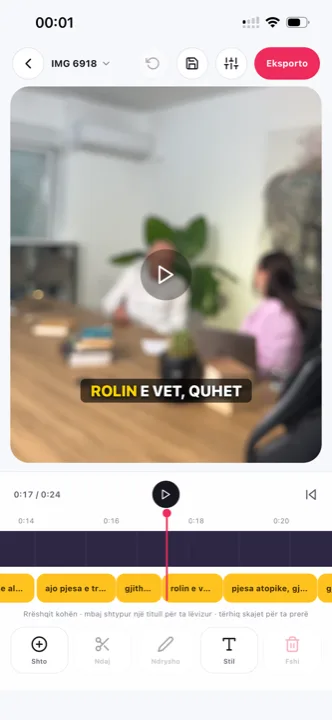
Auto subtitle generator: Titro’s editor with word-timed subtitles over a video
why

Why this auto subtitle generator is different.

01 Word timing, not sentence timing

Most generators time a whole line and let it sit on screen. Titro records when each word starts and ends, so the highlight lands on the word being spoken — the effect you see on the biggest channels, and the reason their viewers keep watching to the end.

02 Subtitles that live inside the video

Platform captions are a layer the platform owns: download the clip, repost it, forward it on WhatsApp, and they are gone. Titro burns the subtitles into the frame, so the video reads the same wherever it ends up.

03 Three languages, mixed freely

English, German and Albanian — including Gheg and Tosk, which most tools treat as one language. A sentence that switches language halfway through comes out right, because that is how people actually talk.

04 An editor, not a black box

Automatic doesn’t mean unchecked. Tap any word to correct it, drag a caption anywhere in the frame, split or merge lines, and see exactly what the export will look like before you make it.

steps

How to generate subtitles automatically.

01

Upload

From your phone’s gallery or from your computer in Titro Studio. Up to 60 minutes per video on Creator, 180 on Studio. Choose how many words show at once and whether the audio needs cleaning.

02

Wait about twenty seconds

The model listens and writes the subtitles with a timestamp on every word. It runs on our servers, so nothing is drained from your phone.

03

Check and style

Read through, fix anything the audio made hard to hear, pick one of eight styles — or the look you saved last time.

04

Export

The video comes out in its original resolution with the subtitles inside, plus an .srt file if you want the text on its own.

in practice

Auto subtitles, in practice.

How accurate is it, honestly

Accuracy follows the audio. Speech recorded close to the mic in a quiet room comes back almost entirely ready; a windy street or a room with echo needs more corrections. Titro cleans and levels the audio before it listens, which is why it copes with the second case better than most, but no generator hears what the microphone didn’t record.

What you can do before uploading to get more out of it

Keep the mic close, avoid two people speaking over each other, and when more than one voice is in the recording say so at upload — each speaker then gets their own name and colour. If names and technical terms come up often, turn on the personal dictionary so that a word you fix once stays fixed in the videos that follow.

Auto subtitle generator versus a captioning service

A human captioner is still the right choice for a broadcast where a single wrong word is a legal problem. For everything that goes on a feed — where the clip is judged in three seconds and replaced tomorrow — the maths is different: twenty seconds and a quick read-through beats a day’s turnaround and an invoice per minute. If you are weighing tools rather than services, the comparison of nine auto subtitle apps puts prices and limits side by side.

Where the finished video goes next

The generator is the middle of the job, not the end. A vertical clip usually heads for TikTok, Reels or Shorts, and each feed covers a different part of the frame with its own interface — the reason Titro’s styles sit in the lower-middle band and move when a shot needs it. For a long YouTube upload the better output is often the subtitle file: viewers can switch it off, and YouTube indexes the text. The .srt export comes from the same project, so one upload serves the short clip and the long version — and because every word is timestamped, the same transcript works as video-to-text transcription for show notes or an archive.

A price you can compute

Generators meter three ways: minutes, videos or credits. Titro counts minutes of uploaded video — 300 a month on Creator at €4.99, up to 60 minutes per video, translation counted double — so a month’s capacity is arithmetic, not a guess, and a daily two-minute clip fits with most of the plan to spare. A failed take costs nothing: delete the video before processing finishes and the minutes come back. Metering by videos caps your length per clip; metering by credits makes the month’s budget depend on which features each video touched. Minutes are the only meter where the number on the plan is the number you can picture.


questions

What you should know.

Which languages does the auto subtitle generator support?

English, German and Albanian, including mixed sentences. Subtitles translate between the three with one click; translated minutes count double.

Does it add a watermark?

No. Paid plans export in the original resolution with nothing added except the subtitles.

Can I get the subtitles as a file instead?

Yes. Every project can be downloaded as .srt, with speaker names included, for YouTube or any other player. The format and its uses are on the SRT file generator page.

How long can a video be?

Up to 60 minutes on the Creator plan and 180 minutes on Studio. Long videos are easier to handle on the web in Titro Studio.

Does it work offline?

No. The listening happens on our servers — that’s what keeps it fast and keeps your phone cool.

What does it cost?

From €4.99 a month for 300 minutes of video. You pay for minutes, not per video, and you can cancel any time.

Is there a free subtitle generator in Titro?

Your first video is free up to three minutes, with no card and no watermark. Free subtitle generators that stay free usually pay for themselves with a watermark, a 720p export or a cap you hit mid-month; Titro’s free part is a real trial of the paid product.

also

Subtitles for everywhere you post.

Try it on your next video.

Upload it now and see it finished before your coffee’s done.

Titro on a phone, showing the home screen and subtitle tools