Home Instagram Reels captions

Reels subtitles stay when the video is reposted

Instagram Reels captions, automatically.

Instagram Reels captions are what hold a viewer through the first three seconds, before the sound is on. Without them, the hook only reaches the people who already had their earphones in.

From €4.99/month · 300 minutes of video · cancel any time
Or work on the web →

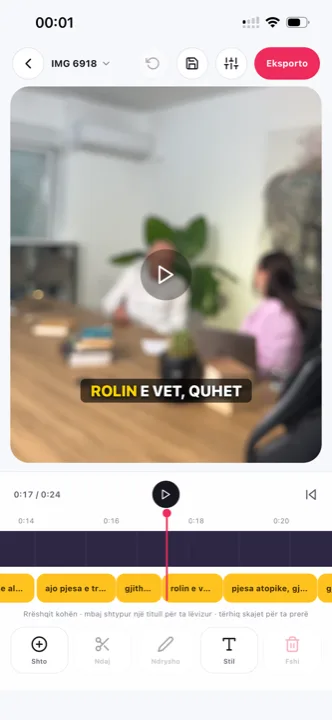
Instagram Reels captions over a vertical video in the Titro editor
why

Why Instagram Reels captions with Titro.

01 Subtitles that travel with the video

Instagram’s captions are a layer of the platform, not of the video. The moment someone saves or forwards the clip, they are gone. Titro burns them into the frame, so the video stays readable everywhere — Reels, Stories, WhatsApp, TikTok.

02 One video, three platforms

The same export goes to Reels, TikTok and Shorts untouched. The vertical format is kept, the subtitles sit inside the safe zone, and you don’t make three versions of the same work.

03 A style that matches your feed

Eight styles, from a loud colour highlight to quiet minimal text. If your profile has a look of its own, the font, the highlight colour and the position are yours to set — and to save under a name for next time.

04 Readable even when you talk fast

Real speech doesn’t pause between words. The model times each word on its own, so a quick delivery still comes out readable instead of a block of text that passes before you’ve finished it.

steps

How to add captions to Reels with Titro.

01

Upload the Reel

From your gallery or from Titro Studio on the web. Vertical, horizontal or square — the original format is kept.

02

Titro listens

Twenty seconds for a short video. The subtitles come back with the exact time of every word.

03

Adjust what you like

Tap a word to change it, drag the caption where you want it, split or merge lines.

04

Export

The video is saved with the subtitles inside, in the original quality. Upload it to Instagram like any other video.

in practice

Instagram Reels captions, in practice.

The safe zone on Reels

Instagram covers roughly the bottom 15% with the username, the caption and the audio, and the top with icons. Subtitles belong in the lower-middle band. Titro’s styles respect that line, and if you also post to Stories it’s worth lifting the caption a little higher, because the interface takes more room there. The same logic for the other vertical feeds is on TikTok captions and YouTube Shorts captions.

Captions that read on a small screen

Most viewers are on a phone, not a tablet. Small type with low contrast disappears over bright footage. Styles with a box or a thick outline are the answer when the video was shot outside, in the sun.

From one long video to several Reels

If you have an interview or a podcast, upload it once in full and cut clips from the same project. The subtitles are already timed, so each clip comes out with its own text without starting the work again. The episode-length workflow — speakers named, silence cut, minutes accounting — is on podcast subtitles. Reels that also run as paid placements follow the same export; so do Facebook videos, which Meta previews on mute.

A look your feed keeps

A Reels grid is a brand surface whether or not you treat it as one. Pick one of the eight styles, set the font and the highlight colour against your feed’s palette, save the result under a name, and every future Reel starts from it. Boxed styles survive bright footage; Minimal suits muted, designed feeds; the loud highlight styles earn their keep on fast talking clips. What matters is less which one you choose than that the choice repeats — a feed where every clip reads the same way is recognisable in the scroll before the username registers, and the saved style is what makes the repetition free.

Reels for a two-language audience

Instagram will not localise your video for you. A creator with followers at home and in the diaspora — or a business selling on both sides of a border — posts the same Reel twice from one project: once with the original subtitles, once translated to English, German or Albanian with a click. Translated minutes count double, the format and quality stay untouched, and the Albanian handling — Gheg, Tosk, English dropped mid-sentence — is the part most tools get wrong and Titro was built around.


questions

What you should know.

Does it work for Stories too?

Yes. The export is a normal 9:16 video, so it goes to Stories, Reels and anywhere else just the same.

Can I change the font?

Yes — five fonts, seven highlight colours, and size and position are free. What you see in the editor is exactly what comes out in the video.

What does it cost?

From €4.99 a month for 300 minutes of video. You pay for minutes, not per video.

Does it understand mixed languages in one sentence?

Yes. Switching language mid-sentence is how people actually speak, and it’s exactly what Titro was built for.

Do I need to know how to edit video?

No. Upload, wait, pick a style, export. The editor is there if you want to change something, not because you have to.

Where should captions sit for Stories?

A little higher than for Reels: Stories put interface at both ends of the frame, and the reply box takes the bottom. Lift the caption above the lower band once, and keep that position for your Stories exports.

Do captions help a Reel’s reach?

Instagram ranks by watch behaviour, and most feed viewing is muted — a Reel that reads without sound keeps viewers an uncaptioned one loses. Instagram’s own caption layer helps too, but it stays behind the moment the clip is saved or shared on; burned-in text travels with the file.

Can I caption a Reel I already posted?

Not in place — download your original, caption it, and use the captioned export going forward or as the ad version. For a Reel with real traction, leave the original up rather than deleting its engagement.

also

Subtitles for everywhere you post.

Try it on your next video.

Upload it now and see it finished before your coffee’s done.

Titro on a phone, showing the home screen and subtitle tools