Home Compare Opus Clip alternative

0 credits a minute of video costs a minute, kept or not

An Opus Clip alternative for the captioning half.

People look for an Opus Clip alternative for two different reasons. If you want AI to find the clips for you, Opus is still the tool. If you already know which clip you want and need it captioned, timed and exported without credits or expiry dates, that is Titro.

From €4.99/month · 300 minutes of video · cancel any time
Or work on the web →

Opus Clip alternative: word-timed subtitles in the Titro editor
in one paragraph

OpusClip and Titro, side by side.

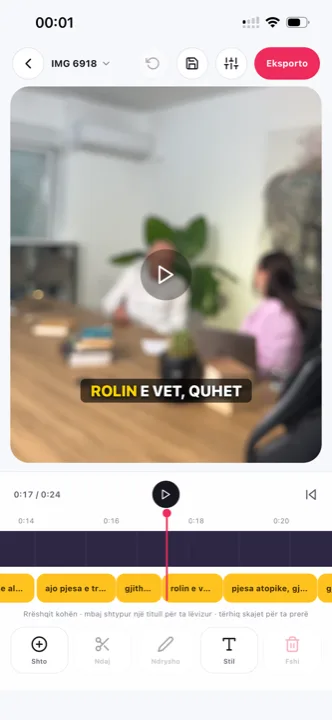
OpusClip takes a long recording, picks moments it predicts will travel, and turns them into captioned shorts with a virality score, on web, iOS and Android, paid for in credits that are charged on the source video’s length. Titro does not pick clips for you. It captions the video you give it, timed to every word, in English, German and Albanian, burns the captions in at the original quality, names speakers, cuts silence, and exports an .srt on every plan. Different jobs; this page is for people who found out they only need the second one — the cut-your-own-clips workflow is on podcast subtitles, and the rest of the field is in the nine-app roundup.

The credit model is the real divider. Opus charges on what you upload, not on what you keep: an hour in is sixty credits gone, whether one clip survives or ten. That is rational for AI clipping — the model watched the whole hour — and expensive for captioning, where you already did the choosing. Price the two tools on your actual ratio of footage uploaded to clips kept, and the answer usually falls out on its own.

the table

Titro vs OpusClip: what you actually get.

TitroOpusClip
Made forSubtitles on talking video, phone firstTurning long videos into many AI-selected short clips
Runs oniPhone, Android, web (one account)Web, iOS, Android (mobile apps have fewer editor features)
Entry price€4.99/month for 300 minutes, or €49/yearFree; Starter $15/month (150 credits); Pro $29/month (300 credits)
Free tierFirst video free, up to 3 minutes, no card60 credits a month, watermarked caption templates, clips expire after three days, no editor
WatermarkNone on paid plansNone on Starter and Pro
Export qualityOriginal resolution kept, 4K stays 4KUp to 1080p on free; “highest available” on paid
Caption languages3: English, German, Albanian (Gheg and Tosk), mixed sentences21 on the official list, including German; Albanian not listed
TimingEvery word timed; highlight follows the spoken wordWord-by-word and karaoke caption templates
TranslationBetween the three languages, one clickOffered through tool pages and the API
Subtitle file (.srt)Yes, every plan, with speaker namesDownload is Pro plan only
Usage limit300 minutes/month, up to 60 minutes per videoCredits equal source minutes: a 60-minute upload costs 60 credits whether you keep one clip or ten
Beyond captionsSpeaker names, silence and filler cut, audio cleanup, teleprompterAI clip selection, virality score, scheduling and publishing
choose OpusClip when
  • You upload hour-long recordings and want the software to choose the highlights.
  • You want a virality score and a publishing calendar in the same tool.
  • You post in one of the 21 languages Titro doesn't cover.
choose Titro when
  • You cut your own clips, or your videos are short to begin with.
  • You want a flat 300 minutes for €4.99 with nothing charged on source length you didn't use.
  • You need the .srt on the entry plan, not the $29 one.
  • You speak Albanian, or mix English, German and Albanian in one video.
in practice

Three situations where the difference shows.

01 The interview you already cut

You know the ninety seconds you want. Upload that clip, not the hour: on Titro it costs ninety seconds; on Opus, cutting from the full upload costs the full upload in credits.

02 The clip that has to keep

Opus clips on the free plan expire after three days. Titro keeps your projects for fourteen days after processing and lets you re-export at any time before then.

03 The subtitle file for YouTube

The .srt with speaker names comes with every Titro plan. On Opus it is a Pro feature.

questions

What you should know.

Does Titro pick clips like Opus Clip?

No. Titro captions the video you give it and lets you cut inside the project, but it does not select highlights or score them.

Is Titro cheaper than Opus Clip?

For captioning, yes: €4.99 a month for 300 minutes against $15 for 150 credits, where a credit is one minute of source video. For AI clipping there is no comparison, because Titro does not do it.

Do Titro projects expire?

Videos are deleted fourteen days after processing, and you can delete them earlier. Opus free-plan clips expire after three days.

Does Titro have an Android app?

Yes, native, alongside the iPhone app and the web studio.

Can Titro export an .srt on the cheapest plan?

Yes, on every plan, with speaker names.

Can I use Opus Clip and Titro together?

Some people do: Opus to find the moments in a long archive, Titro to caption the chosen clips in a saved style on a flat minute quota — and to redo a caption without burning credits on the retry.

Does Titro score clips or schedule posts?

No. It captions, translates and exports; choosing the moment and the posting time stays your judgement. If you cut clips from episodes, that flow is on podcast subtitles.

What kind of videos is Opus the wrong tool for?

Short clips shot vertical, scripted takes, single-speaker explainers — videos with no highlights to find. There, credit-based clipping buys nothing and a flat caption pass is the whole job.

Does Titro expire exports?

Exports are yours the moment they are saved — files on your phone or computer never expire. Projects stay editable for fourteen days after processing, and you can re-export any time before then.

sources

Where these facts come from.

Vendor pricing and help pages first; a third-party source only where the vendor publishes no page. If something has changed, write to support@titroshqip.com and we will correct it.

also compared

Other tools people switch from.

Try it on your next video.

Upload it now and see it finished before your coffee’s done.

Titro on a phone, showing the home screen and subtitle tools