Home Auto captions

8 styles TikTok, Box, Karaoke, Podcast, Neon, Top, Pop, Minimal

Auto captions for your videos, word by word.

Auto captions are the difference between a video that is watched on mute and one that is scrolled past. Titro generates them in about twenty seconds, times them to every word, and burns them into the video at its original quality.

From €4.99/month · 300 minutes of video · cancel any time
Or work on the web →

Auto captions in the TikTok style over a video in Titro
why

Why these auto captions look like the ones on big accounts.

01 Timed to the word, highlighted on the word

Line-at-a-time captions make the viewer read ahead of the voice. Titro knows when every word starts, so the highlight moves with the speech. It is the style you see on the accounts that keep people to the end, and it comes out of the generator by default.

02 Burned in, so they go where the video goes

The auto captions TikTok, Instagram and YouTube add are a layer of the platform; download or repost the video and they are gone. Titro renders them into the frame in the original resolution, with no watermark on any paid plan.

03 Styles that fit the feed, not a template gallery

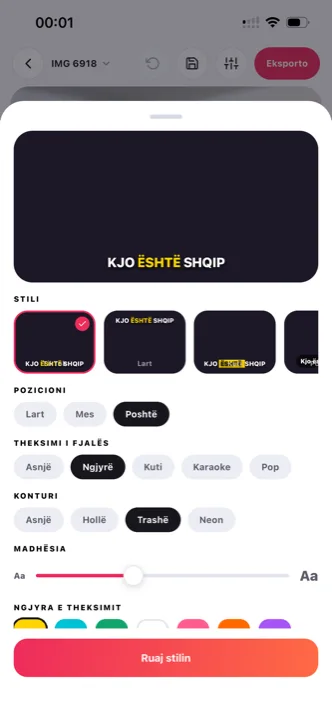
Eight looks built for vertical video, five fonts, seven highlight colours, eight entrance effects, and any caption can be dragged anywhere. Save the look you settle on and pick it at upload.

04 Three languages, mixed freely

English, German and Albanian, including sentences that switch between them. Most auto caption tools handle that switch badly; it is what Titro was built around.

steps

How the auto caption generator works.

01

Upload

From your phone’s gallery, or from your computer in Titro Studio. Choose how many words show at once.

02

Twenty seconds

The model listens and returns the captions with a timestamp on every word.

03

Pick a style, fix a word

Choose one of the eight styles or your saved look. Tap any word the audio made unclear.

04

Export

The video with the captions inside, in the original quality, saved to your gallery or downloaded. An .srt too if a platform wants a file.

in practice

Auto captions, in practice.

Auto captions on the platforms versus your own

TikTok, Instagram and YouTube all generate captions, and all three are worth turning on. They are also small, off by default on many phones, shaky on names and on any language but English, and they stay behind when the video is reposted. Your own burned-in captions are on for everyone, in your style, on every copy. The TikTok-specific walkthrough, both routes step by step, is on how to add captions on TikTok; the argument for doing the work at all is on why subtitles matter.

Where captions should sit

Every feed covers part of the picture: TikTok’s description and icons at the bottom right, Instagram’s username and audio along the bottom, Shorts’ buttons down the right edge. The safe band is the lower middle. Titro’s styles start there, and any caption moves when the shot needs it.

How many words at once

Two or three words per line read fastest on a phone and hide the least. You set the pace at upload and can split or merge lines afterwards.

Auto captions beyond the short clip

The same engine handles a 60-minute video on Creator and 180 on Studio, which changes what auto captions are for: a whole podcast episode captioned once and cut into clips, or a recording transcribed to text for show notes with an .srt on the side. Scripted takes skip recognition entirely — with the teleprompter, the captions are your script word for word, so names and product terms cannot come out wrong.

How Titro’s auto captions compare

CapCut, Submagic, Captions and VEED all generate captions too, each with a different price structure and a different set of limits. The side-by-sides are under CapCut, Submagic, Captions and VEED, with all nine tools in the one honest comparison — prices and language lists checked against the vendors’ own pages, including where they beat Titro.

The eight styles, and when each one works

TikTok is the loud default: capital letters, a colour highlight on the active word, built for a crowded vertical feed. Box and Podcast put the text on a solid or soft background, which is the safe choice over bright, busy footage — a beach, a street, a ski slope — where outlined text alone washes out. Karaoke sweeps the highlight through the line, Pop and Neon are for accounts whose whole feed has that energy, Top moves the text out of the lower band when the shot needs the bottom of the frame, and Minimal is the quiet one for brand channels that want subtitles without a look. All eight take any of the five fonts and seven highlight colours, and the look you settle on can be saved under a name and picked at upload — which is how an account keeps every video consistent without rebuilding the style.


questions

What you should know.

Is the auto caption generator free?

Your first video is free up to three minutes, no card and no watermark. Plans start at €4.99 a month for 300 minutes.

Does it work on iPhone and Android?

Yes, natively on both, and in the browser as Titro Studio, on one account.

How accurate are the auto captions?

Clean audio comes back almost entirely right; wind and echo cost a few corrections. Titro cleans the audio first, and every word you fix is a tap.

Can I translate the captions?

Yes, between English, German and Albanian, with one click.

Do the captions cover the buttons on TikTok or Reels?

No. The styles keep the text in the safe band, and you can drag any caption if your shot needs it.

Can I move or resize the captions?

Yes — drag any caption anywhere in the frame, change the size, and the editor shows exactly what the export will look like. The styles are starting points, not cages.

Do auto captions work on screen recordings and voiceovers?

Yes — anything with speech. A voiceover over b-roll captions the narration; a screen recording captions the explanation. The source of the picture doesn’t matter, only the audio.

also

Subtitles for everywhere you post.

Try it on your next video.

Upload it now and see it finished before your coffee’s done.

Titro on a phone, showing the home screen and subtitle tools