Home How to add captions on TikTok

2 ways TikTok’s own captions, or captions inside the video

How to add captions on TikTok, two ways.

How to add captions on TikTok depends on what you need them to do. TikTok’s built-in captions take a minute and cost nothing. Captions burned into the video take about the same minute, look the way you chose, and stay on the clip wherever it goes. Here are both, step by step.

From €4.99/month · 300 minutes of video · cancel any time
Or work on the web →

How to add captions on TikTok: the TikTok caption style in Titro
why

Which way to add captions on TikTok.

01 TikTok’s own captions: fast, free, fragile

In the editor after recording or uploading, tap Captions and TikTok transcribes the audio. Viewers can turn them off, they are styled by TikTok, and they vanish the moment the video is downloaded, reposted to Reels or forwarded in a chat.

02 Burned-in captions: yours, everywhere

Rendered into the picture before you upload. Same look on every platform, on for everyone, timed to the word if the tool does that. The cost is one extra app in the flow, and the benefit is a clip that reads the same in a WhatsApp forward as in the feed.

03 What decides it

Post once and never repurpose: TikTok’s captions are fine. Post the same clip to Reels and Shorts, run it as an ad, or speak a language TikTok transcribes badly: burn them in.

04 Why timing matters more than style

Captions that highlight the word being spoken hold viewers; line-at-a-time captions make them read ahead of the voice. TikTok’s captions are line-based. Titro times every word.

steps

How to add captions on TikTok with Titro, burned in.

01

Upload the video to Titro

From the gallery on iPhone or Android, or in the browser at Titro Studio. The 9:16 format is kept.

02

Wait about twenty seconds

The captions come back timed to every word, in English, German or Albanian, mixed sentences included.

03

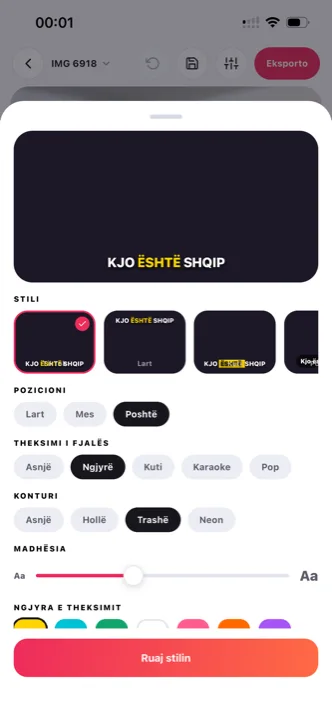
Pick the TikTok style

Big letters, colour on the spoken word, positioned above TikTok’s description and icons. Fix any word with a tap.

04

Export and upload to TikTok

Save to the gallery, open TikTok, upload as usual. Leave TikTok’s own captions off so the two don’t overlap.

in practice

How to add captions on TikTok using TikTok itself.

Adding TikTok’s built-in captions

Record or upload in the TikTok app, then on the edit screen tap Captions in the right-hand toolbar. TikTok transcribes the speech; tap the text to fix words and choose one of TikTok’s caption styles. Tap Done and post. On videos already published you cannot add captions afterwards; you would re-upload.

If TikTok’s captions are missing or wrong

The Captions button only appears when TikTok detects speech in a supported language; music-only clips and quiet audio get no button. Wrong words are common on names, slang and any language but English. Fix them by tapping the text, or turn captions off and burn your own in — the styles and safe zones for that route are on TikTok captions. If you caption inside CapCut instead, its own failure modes are on CapCut auto captions.

Can viewers turn burned-in captions off?

No, and that is the point for feed video: most people watch on mute, and a caption that can be switched off is a caption that is off. For long-form YouTube, where viewers may want the choice, use an .srt file instead; Titro exports one from the same project. The same two-way choice exists on Facebook and Reels.

Captions on TikTok ads

The ad feed is as muted as the organic one, and TikTok’s own captions do not follow a video into Ads Manager the way burned-in text does. A Titro export is a normal video file at the original resolution, so it uploads as ad creative like any other asset. Two placement habits pay off: keep the text in the centre band, because ad placements overlay call-to-action elements along the bottom edge; and put the claim in the first caption on screen, since the mute viewer meets your text before your voice. The same creative re-exports with German or Albanian subtitles in one click when the campaign splits by audience.

Keeping one look across your TikToks

TikTok’s built-in captions always look like TikTok. Burned-in captions can look like you — and the difference compounds over a profile grid. Start from Titro’s TikTok style, adjust the font and the highlight colour once, save the result under a name, and pick it at upload from then on. Keep the line length consistent too: two or three words per line is the setting that reads at feed speed, and switching it clip to clip is as noticeable as switching fonts. A profile where every video carries the same caption voice reads as a channel, not a collection of clips.


questions

What you should know.

Do I need TikTok’s captions and burned-in captions?

No. One or the other. Two sets on the same clip overlap and look broken.

Can I add captions to a TikTok I already posted?

Not inside TikTok. Download the original, caption it in Titro, and re-upload.

Does Titro keep the captions out of TikTok’s buttons?

Yes. The TikTok style sits in the safe band above the description and icons, and you can drag any caption if the shot needs it.

Which languages does Titro caption?

English, German and Albanian, including sentences that switch between them. TikTok’s own captions support more languages, with lower accuracy outside English.

Is Titro free?

Your first video is free up to three minutes, no card. Plans start at €4.99 a month for 300 minutes.

Does TikTok rank captioned videos higher?

TikTok ranks on watch time, and most scrolling happens on mute. Captions keep the viewer who cannot or will not turn the sound on, and that retention is the signal the algorithm rewards — the mechanism is laid out on why subtitles matter.

Which route is faster in practice?

For one clip, TikTok’s own captions — they are generated where you already are. Across a week of posting, burning them in wins: one saved style, no re-fixing the same names in TikTok’s editor each time, and the same export reposts to Reels and Shorts without redoing anything. The first captioned export usually settles the question.

also

Subtitles for everywhere you post.

Try it on your next video.

Upload it now and see it finished before your coffee’s done.

Titro on a phone, showing the home screen and subtitle tools