Home Caption generator

3 languages English, German, Albanian — even in one sentence

A caption generator that listens to every word.

A caption generator is worth using when the captions it writes are right the first time and quick to fix when they aren’t. Titro listens to the whole video, puts a timestamp on every word, and opens the result in an editor where a wrong word is one tap away from right.

From €4.99/month
Or work on the web →

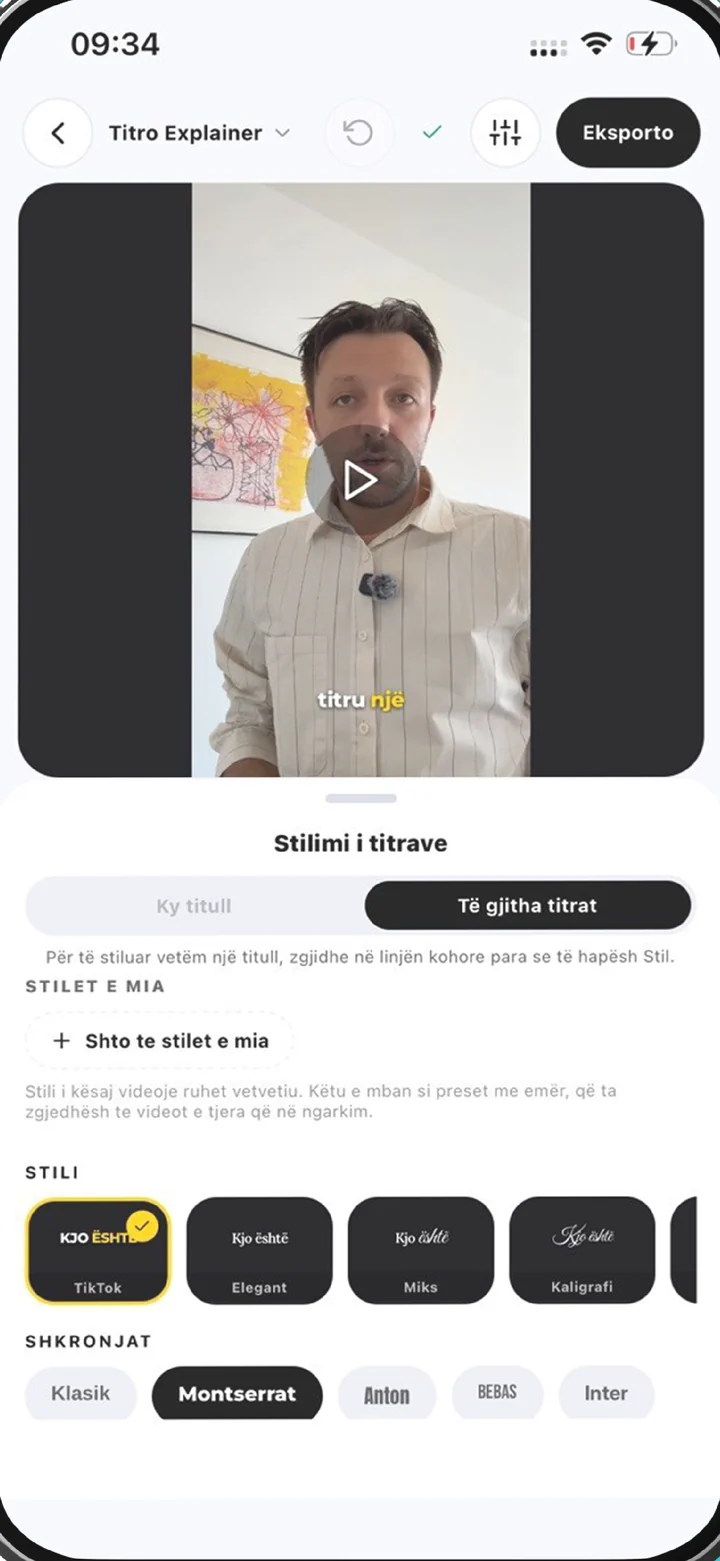
Caption generator in the Titro editor: the style panel open over a captioned video
why

What a caption generator should actually do.

01 It listens to the word, not the sentence

The speech model records when each word starts and ends, so the caption changes exactly when the voice does and the spoken word can light up as it is said, karaoke style. Captions timed by the sentence sit on screen too long or leave too early; captions timed by the word keep pace with the speaker.

02 It writes what was said, and lets you correct it

Generated captions are a draft you can trust most of, not all of. Tap any word to fix it, drag a caption anywhere in the frame, split a line that runs long or merge two short ones. Turn on the personal dictionary and the names you correct once are remembered for the videos that follow.

03 It gives you a look, not just text

Presets for the way people actually post — TikTok, Box, Podcast, Karaoke, Pop, Neon, Minimal, Elegant and more — plus fonts, text and highlight colours, and entrance effects such as Typewriter, Bounce, Zoom and Fade. One caption can even carry a different style from the rest when a line deserves the emphasis.

04 It keeps the captions in the video

The export is the original video at its original resolution with the captions rendered into the frame, so they survive downloads, reposts and forwards. When a player wants a file instead, Titro Studio on the web downloads the same captions as an .srt, speaker names included.

steps

How to use the AI caption generator.

01

Upload the video

From the gallery in the iPhone or Android app, or from your computer at app.titro.live. Choose how many words appear at once, whether the audio needs cleaning, and whether more than one person speaks.

02

Let the generator listen

A short video comes back in about twenty seconds; a long one takes longer. The work runs on Titro’s servers, so your phone is free while it happens.

03

Read, fix and style

Read the captions through, tap any word the audio made unclear, pick a preset or the look you saved last time, and move a caption if it covers a face or a product.

04

Export

Save the video with the captions burned in, at the resolution you shot it in. In Titro Studio you can also download the .srt.

in practice

Getting more out of a caption generator.

AI caption generator, auto caption generator: the same tool

People search for an AI caption generator, an auto caption generator or simply a caption generator, and mean the same thing: software that turns speech into timed on-screen text without anyone typing it. The “AI” is a speech recognition model. It is good at hearing and timing words; it does not invent new ones, summarise or rewrite. That matters because the captions are a record of what was said, and in Titro they stay one — even in videos recorded with the teleprompter, the captions follow the voice, and the script only decides how names and terms you actually spoke are spelled. For the generator’s cousin aimed at subtitles and translation, see auto subtitle generator; for the captions-only angle, auto captions.

What the generator can’t hear

Accuracy follows the recording. A voice close to the microphone in a quiet room comes back almost ready to post; wind, echo, music under the voice and two people talking at once all cost corrections. Turn on audio cleanup at upload for anything shot outdoors or in a hard room — Titro cleans and levels the track before it listens. If the same brand name or place comes up every week, the personal dictionary is the fix: correct it once and the generator spells it your way from then on. The one thing no setting fixes is a word the microphone never caught, which is why the read-through before export is part of the job, not a sign that something failed.

Captions for each feed

The generator is the same everywhere; the frame it writes into is not. TikTok, Reels and Shorts each cover a different part of the picture with buttons and text, and Facebook previews in a muted feed with its own layout. Placement and line length for each are on TikTok captions, Instagram Reels captions, YouTube Shorts captions and captions for Facebook video. For a long YouTube upload the better output is usually a subtitle file, covered on the YouTube subtitle generator page.

Interviews, podcasts and long recordings

A caption generator earns most of its keep on the videos nobody wants to caption by hand. Say “more than one voice” at upload and each speaker gets a name and a colour, in the video and in the .srt. One tap finds long pauses and filler words and cuts them, and the captions are retimed to match. Videos run up to 60 minutes on Creator and 180 on Studio, and long ones are easier to handle in the browser. The workflows are on subtitles for interviews, podcast subtitles and subtitling long videos.

Free caption generators and what they cost

Your first Titro video is free up to three minutes, with no card. It is the real product at full resolution, with one difference: a small Titro mark, which paid plans don’t carry. After that, Creator is €4.99 a month for 300 minutes of video, all styles and translation included; Studio, for agencies and newsrooms, is €29 a month with no practical limit. Minutes are counted on the video’s length, so a month’s capacity is simple arithmetic. If you are weighing other tools — CapCut, Submagic, Captions, VEED — the nine-app comparison lays out prices and limits side by side, and the CapCut comparison covers the one most people start with.


questions

What you should know.

Is the caption generator free?

Your first video is free up to three minutes, with no card. It carries a small Titro mark; paid plans, from €4.99 a month for 300 minutes, export without one.

Which languages does it caption?

English, German and Albanian, including Gheg and Tosk and sentences that switch language halfway through. Other languages aren’t supported, so a video in French or Italian won’t caption correctly in Titro.

Is this an AI caption generator?

Yes — a speech recognition model listens to the audio and times every word. It writes down what was said; it doesn’t rewrite, summarise or add words of its own.

How long does it take?

About twenty seconds for a short video. Longer videos take longer, and the processing runs on Titro’s servers, not your phone.

Can I download the captions as a file?

Yes, in Titro Studio on the web: every project downloads as an .srt, with speaker names if there are several. The format is explained on the SRT file generator page.

Does it work on iPhone and Android?

Yes, as an app on both, and in the browser as Titro Studio — one account across all three.

Can the generator translate the captions?

Yes, with one click, between English, German and Albanian in any direction. Translated minutes count double. More on the video subtitle translator page.

also

Subtitles for everywhere you post.

Try it on your next video.

Upload it now and see it finished before your coffee’s done.

Titro on a phone, showing the home screen and subtitle tools