Home Compare CapCut alternative
no cap on caption generations — you pay for minutes
Looking for a CapCut alternative because the auto captions started asking for Pro? CapCut is a full editor that also does captions. Titro is the other way round: captions are the whole product, timed to the word, exported clean, on the phone the video is already on.
From €4.99/month · 300 minutes of video · cancel any time
Or work on the web →
CapCut is ByteDance's free video editor for iOS, Android, desktop and web, with auto captions among hundreds of features. Titro is a subtitle tool: upload, wait about twenty seconds, fix the odd word, pick a style, export. If you edit heavily, keep CapCut. If most of what you post is a person talking to a camera, Titro gets the captioned video out faster and with fewer surprises. The caption feature itself — how to use it, the cap, the common failures — is dissected on CapCut auto captions; the rest of the field is in the nine-app roundup.
The decision is rarely either-or. Plenty of accounts cut in CapCut and caption in Titro, because the two steps fail differently: the edit is creative work you want tools for, the caption pass is a bottleneck you want gone. The table below is for the captioning half. If your month is mostly talking clips with light cuts, the dedicated tool wins on time; if every video is a heavy build, keep the editor and judge the caption cap on its own terms.
| Titro | CapCut | |
|---|---|---|
| Made for | Subtitles on talking video, phone first | Full video editing with captions as one feature |
| Runs on | iPhone, Android, web (one account) | iOS, Android, Windows, macOS, web |
| Entry price | €4.99/month for 300 minutes, or €49/year | No public pricing page. App Store: Standard about $9.99/month, Pro about $19.99/month |
| Free tier | First video free, up to 3 minutes, no card | Free editor with 1080p export; auto captions free with an undocumented usage cap, then a Pro prompt |
| Watermark | None on paid plans | None on ordinary exports; a Pro watermark on premium templates and effects |
| Export quality | Original resolution kept, 4K stays 4K | 1080p free, 4K on Pro |
| Caption languages | 3: English, German, Albanian (Gheg and Tosk), mixed sentences | Marketed as 20+ for auto captions; no official list. Albanian not named anywhere we could find |
| Timing | Every word timed; highlight follows the spoken word | Word-by-word highlight available |
| Translation | Between the three languages, one click | Yes, marketed as 100+ languages |
| Subtitle file (.srt) | Yes, every plan, with speaker names | Yes, from the desktop app |
| Usage limit | 300 minutes/month, up to 60 minutes per video | Undocumented free cap on caption generations; no published paid limit |
| Beyond captions | Speaker names, silence and filler cut, audio cleanup, teleprompter | Everything an editor has: templates, effects, stickers, transitions |
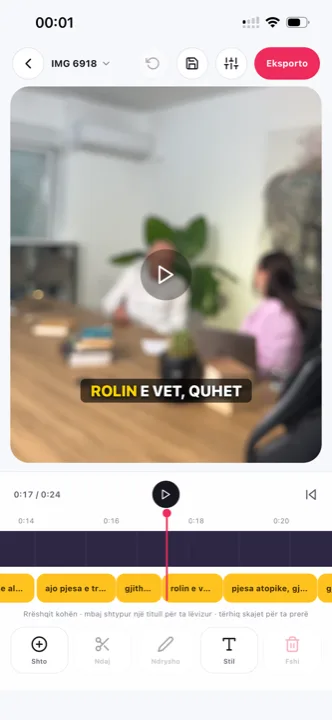
Record, upload from the gallery, twenty seconds, TikTok style, save. No timeline to open, no project files, no templates to dismiss.
Upload the whole thing once, speakers get names and colours, cut clips from the same timed transcript. CapCut would have you caption each clip separately.
Post the same video with English subtitles and then with German ones. Translation is one click and counts double minutes; no second tool.
Your first video is free up to three minutes, with no card. After that it is €4.99 a month for 300 minutes. CapCut's editor is free; its auto captions are free until an undocumented cap, after which it asks for Pro.
You can trim, cut silence and filler words, move and restyle every caption, and add entrance effects. Titro is not a layer-based editor with transitions and music; for that, cut in CapCut first and caption in Titro.
No. Paid plans export clean in the original resolution.
English, German and Albanian, including sentences that mix them. CapCut covers more languages but does not publish an official list for auto captions.
Yes, an .srt with speaker names on every plan, from the phone or the web.
Yes, and it is the most common setup among switchers: edit in CapCut, export, caption the export in Titro. The step-by-step for both routes is on CapCut auto captions.
Yes — it is the default, not a template option. Every word carries its own timestamp, so the highlight lands on the word being spoken in all eight styles.
Yes — caption the exported file like any other video. The original resolution is kept on the way through, so nothing is lost between the edit and the captions.
Upload one finished CapCut export to Titro — the first video is free up to three minutes, no card — and compare the result against your usual caption pass. The decision is usually made by that one clip.
Vendor pricing and help pages first; a third-party source only where the vendor publishes no page. If something has changed, write to support@titroshqip.com and we will correct it.
Upload it now and see it finished before your coffee’s done.