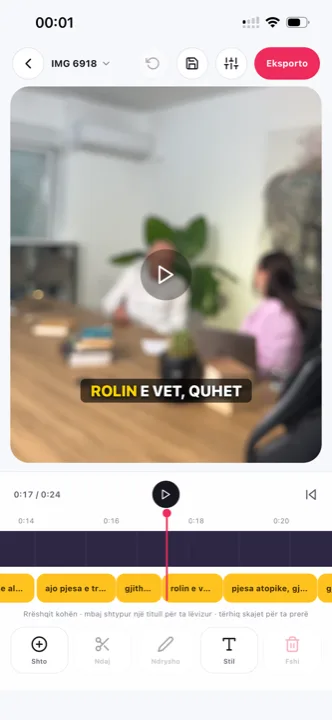
Home CapCut auto captions
+82% searches for “CapCut auto captions” in the last year
CapCut auto captions are the most used caption feature in the world, and the most searched for when they stop working. This page covers how to turn them on, the usage limit that appeared on the free plan, the common failures, and the honest case for captioning in a dedicated tool instead.
From €4.99/month · 300 minutes of video · cancel any time
Or work on the web →
CapCut’s recognition is solid for clear English audio and offers word-by-word highlight styles. Since 2025 free accounts report hitting an undocumented cap on caption generations, after which the button asks for Pro. CapCut has not published the exact number.
CapCut markets auto captions for “20+” languages and translation for “100+”, but publishes no official list. Albanian is not named anywhere we could find, and accuracy outside English is uneven.
If you cut, layer and add effects anyway, captioning in CapCut is convenient. If captions are the only reason you open it, you are running a full editor for one button, and paying Pro prices for it once the cap hits.
Titro does captions only: upload, twenty seconds, every word timed, burned in at original quality, no watermark on paid plans, in English, German and Albanian, for €4.99 a month with a published minute quota. No cap you discover mid-month.
In the CapCut app: New project → select the clip. On desktop: Import → drag the clip to the timeline.
App: tap Text → Auto captions. Desktop: Text → Auto captions → Create. Choose the spoken language.
Tap the generated text to fix words. Pick a template; word-by-word highlight is under the animation options.
Free accounts export 1080p without a watermark on ordinary projects; Pro templates add a watermark unless you upgrade. On desktop, captions can also be exported as an SRT.
Free users report that after a handful of caption generations within a rolling period the feature shows a Pro prompt. CapCut does not document the limit, and reports of the number vary. If you caption more than a few clips a week, budget for CapCut Pro, or move the captioning step to a tool that publishes its quota — the full side-by-side with prices and limits is the Titro–CapCut comparison.
The usual causes: the audio is music-only or too quiet for speech detection, the spoken language is not the one selected, the clip is muted in the timeline, the app is out of date, or the free cap was reached. Check the language setting and the clip’s volume first; update the app; then check whether a Pro prompt is what is actually blocking you. If the blocker is the cap and captions are all you need, the burned-in route is on TikTok captions and auto captions.
The feature is free to start and exports without a watermark on ordinary projects. Premium templates, some effects and, in practice, sustained use of auto captions push toward Pro, which the App Store lists at roughly $9.99 to $19.99 a month depending on tier and region.
Nothing about outgrowing CapCut’s captions requires abandoning CapCut. The split most switchers land on: cut, layer and grade in CapCut exactly as before, export the finished video, then caption that export in a tool whose quota is published — in Titro’s case 300 minutes a month on Creator, up to 60 minutes per video, counted on the video’s length. The TikTok-style look survives the move: colour highlight on the active word, capitals, lower-middle position, with the styles and safe zones laid out on TikTok captions. What changes is the failure mode — no undocumented cap arriving mid-month, and the caption step stops being the reason a finished edit sits unposted. If every video you make is a heavy build, keep captioning where you edit; if most of your month is talking clips, the dedicated step is faster twice over.

Free accounts hit an undocumented usage cap on caption generations. After it, the feature shows a Pro prompt until the period resets or you subscribe.
CapCut publishes no official language list for auto captions and Albanian is not named anywhere we found. Titro captions Albanian, including Gheg and Tosk.
Yes, from the desktop app: Text → Auto captions → Export.
For captions, yes; for editing, no. Titro does not cut, layer or add effects. See the side-by-side comparison.
No cap. 300 minutes of video a month on Creator, 60 minutes per video, published up front.
Generation is the same; the export options differ — SRT export is desktop only. If you caption on the phone and need a subtitle file, that is one more reason the captioning step often moves to a dedicated tool.
Nothing documented — the cap itself is undocumented. Waiting for the period to reset or paying for Pro are the known options inside CapCut; moving the caption step to a tool with a published quota is the option outside it.
Vendor pricing and help pages first; a third-party source only where the vendor publishes no page. If something has changed, write to support@titroshqip.com and we will correct it.
Upload it now and see it finished before your coffee’s done.