Home Compare Captions app alternative

0 credits a minute of video costs a minute, nothing else

A Captions app alternative with minutes, not credits.

Most people looking for a Captions app alternative are tired of watching credits disappear into AI edits they didn't keep. Titro has no credits: 300 minutes of video a month for €4.99, and a failed attempt costs nothing because you re-upload.

From €4.99/month · 300 minutes of video · cancel any time
Or work on the web →

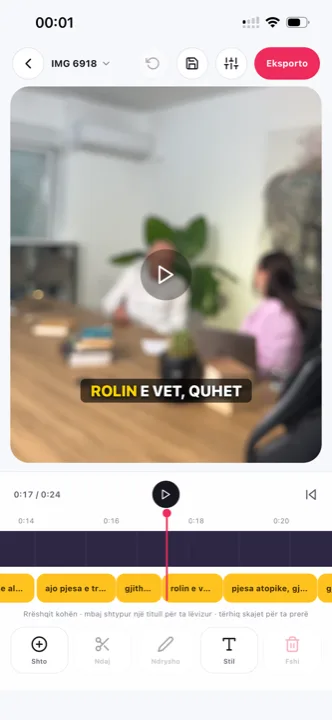
Captions app alternative: word-timed subtitles in the Titro editor
in one paragraph

Captions and Titro, side by side.

Captions, by the company now called Mirage, is an AI video app for iOS, Android and web with captions at its core and a large set of AI features around them: dubbing, lip sync, avatars, AI edits, all paid for in monthly credits. Titro is narrower and cheaper: word-timed subtitles in English, German and Albanian, burned in at the original quality, with speaker names, silence cutting and a teleprompter. Same platforms, different scope and a different way of paying. The whole field sits in the nine-app roundup.

Credits price features; minutes price footage. On Captions, a month’s budget depends on which AI features each video touched — fine when dubbing and avatars are why you came. When subtitles are why you came, the credit meter adds accounting to a job that is otherwise twenty seconds long. Titro’s bet is the opposite: fewer features, a flat quota in minutes, and the scripted-take teleprompter covering the one case where accuracy has to be perfect.

the table

Titro vs Captions: what you actually get.

TitroCaptions
Made forSubtitles on talking video, phone firstAI video creation with captions, dubbing and avatars
Runs oniPhone, Android, web (one account)iOS, Android, web
Entry price€4.99/month for 300 minutes, or €49/yearFree; Basic $9.99/month (200 credits); Max $24.99/month (500 credits); Frontier from $69.99/month
Free tierFirst video free, up to 3 minutes, no cardA one-time allowance of credits; exporting with any AI feature or caption style requires an upgrade
WatermarkNone on paid plansNone on paid plans
Export qualityOriginal resolution kept, 4K stays 4KSelectable at export; per-plan maximum not documented
Caption languages3: English, German, Albanian (Gheg and Tosk), mixed sentences99 on the official list, including German; Albanian not listed
TimingEvery word timed; highlight follows the spoken wordAnimated caption styles
TranslationBetween the three languages, one clickAI translate and dubbing on Max and Frontier
Subtitle file (.srt)Yes, every plan, with speaker namesYes, as an advanced export option
Usage limit300 minutes/month, up to 60 minutes per videoCredits per month; AI features consume them
Beyond captionsSpeaker names, silence and filler cut, audio cleanup, teleprompterAI dubbing, lip sync, avatars, AI edits, voiceover
choose Captions when
  • You want AI dubbing, lip sync or avatars, not just subtitles.
  • You post in a language outside English, German and Albanian.
  • You want the largest library of caption looks and are fine paying in credits.
choose Titro when
  • You caption a lot of talking video and want a flat monthly quota in minutes.
  • You speak Albanian, or mix English, German and Albanian in one sentence.
  • You need speaker names in interviews and an .srt with them on every plan.
  • You record from a script and want subtitles that are exactly your words.
in practice

Three situations where the difference shows.

01 The weekly podcast clips

Upload the episode once, speakers named, cut as many clips as you like. No credit is spent per clip.

02 The retake

Uploaded the wrong take? Delete it before processing finishes and the minutes come back. Nothing is burned on a mistake.

03 The scripted product video

Write the script, read it off the teleprompter, and the subtitles are your text word for word. There is no transcription to get names wrong.

questions

What you should know.

Is Titro cheaper than Captions?

Titro Creator is €4.99 a month for 300 minutes. Captions Basic is $9.99 a month for 200 credits. What a credit buys depends on the feature, so compare on your own workload: for plain subtitling, Titro's minute quota is the simpler number.

Does Titro do dubbing or avatars?

No. Titro subtitles and translates subtitles; it does not generate voices or faces.

Does Titro have a free plan?

Your first video is free up to three minutes, with no card required.

Can I use Titro on Android?

Yes: iPhone, Android and the web, on one account.

Does Titro export .srt files?

Yes, on every plan, with speaker names when there are several.

Do failed attempts cost anything in Titro?

No. Delete a video before processing finishes and the minutes come back. Nothing is burned on a result you did not keep — which is the practical difference from a credit meter.

Which tool for interviews and podcasts?

Both name speakers. Titro writes the names into the .srt on every plan and colours each voice in the video; the episode-to-clips workflow is on podcast subtitles.

What does Titro not have that Captions has?

Dubbing, lip sync, avatars, AI edits and the larger template library. If any of those is the reason you pay for Captions, Titro is not a replacement — it covers the subtitle half only, and the table above says so plainly.

Can I try both before deciding?

Both have a free way in: Captions with its one-time credit allowance, Titro with the first video free up to three minutes and no card. Run the same clip through each and judge the subtitles, the export and the number of steps on your own footage.

Which languages do the two tools cover?

Captions lists 99 languages; Titro covers three — English, German and Albanian — plus the sentences that mix them. If your language is on their list and not ours, that settles it; if it is Albanian, it settles it the other way.

sources

Where these facts come from.

Vendor pricing and help pages first; a third-party source only where the vendor publishes no page. If something has changed, write to support@titroshqip.com and we will correct it.

also compared

Other tools people switch from.

Try it on your next video.

Upload it now and see it finished before your coffee’s done.

Titro on a phone, showing the home screen and subtitle tools