Home Caption app

iOS + Android and the web, on one account

A caption app for iPhone and Android.

A caption app should do the whole job on the phone the video is already on — and then get out of the way. That is what Titro is built to be.

From €4.99/month · 300 minutes of video · cancel any time
Or work on the web →

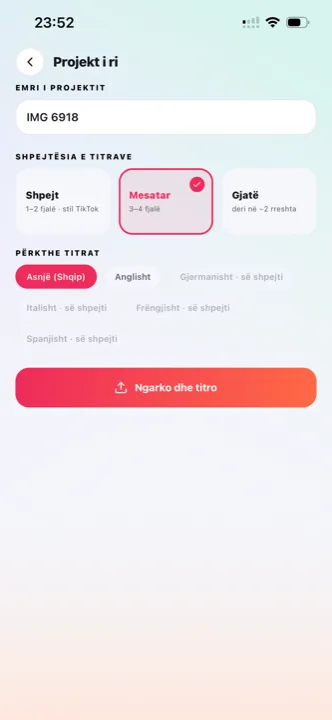
Caption app: choosing a video from the gallery in Titro on iPhone
why

What to expect from a caption app.

01 Everything from the gallery, back to the gallery

Pick the video, wait, adjust, save. The finished video lands next to the original in your camera roll, ready for whatever app you post from. No exporting to a computer, no cable.

02 No watermark, no quality loss

The export keeps the original resolution and leaves the audio alone. There is no logo in the corner on any paid plan and no “upgrade to remove” step.

03 Real editing by touch

Tap a word to fix it, drag a caption anywhere in the frame, split or merge lines, switch style, add an entrance effect — the same tools as the web editor, sized for a thumb.

04 Continue on the web

The same account opens in the browser as Titro Studio, with a layered timeline and a big screen. Start a project on the phone, finish it at the desk, or the other way round.

steps

How the app works.

01

Install and sign in

From the App Store or Google Play. One account works on the phone and on the web.

02

Pick a video

From the gallery, or record one in the app — with the teleprompter if you are reading a script.

03

Wait twenty seconds

The captions come back timed to every word. The processing runs on our servers, so the phone stays cool and the battery stays where it was.

04

Style, check, save

Pick one of eight styles or your own saved look, fix anything the audio made unclear, and save the video to the gallery.

in practice

The caption app, in practice.

Why the processing happens on a server, not on the phone

Speech recognition that timestamps every word in three languages is heavy. Running it on the device would mean a smaller model, a hot phone and a long wait. Titro uploads the video, does the work on its own machines, and sends back the timed text — the phone only handles the editing, which it is good at.

What the app does beyond captions

Audio cleanup for wind and echo, a one-tap cut of silence and filler words, speaker names and colours for interviews, translation between English, German and Albanian, a personal dictionary for names you keep correcting, and a teleprompter for videos you record from a script — a scripted take gets subtitles that are your text word for word, with nothing transcribed.

Free to try, minutes to pay for

Install and sign up without a card. Plans start at €4.99 a month for 300 minutes of video — a one-minute video costs one minute, and unused minutes reset with the month.

Which captions the app makes

The output is auto captions burned into the frame, timed to each word, in one of eight styles. For TikTok, Reels and Shorts the styles sit inside each feed’s safe zone; the platform-by-platform detail is on TikTok captions, Reels captions and Shorts captions. When a platform wants a file instead of burned-in text, the same project exports an .srt — and for long recordings, the app hands over to Titro Studio in the browser, where an hour-long episode follows the podcast workflow.

How it compares to the other caption apps

The apps people usually weigh against Titro are Captions (now Mirage), CapCut, Submagic and VEED. The side-by-sides are under Captions, CapCut, Submagic and VEED, and all nine tools sit in one comparison with prices and limits checked against the vendors’ own pages. The short version: Titro is the narrow tool — subtitles only, minutes not credits, native on both phones.

Phone, web, or both

The phone app is the right place for the daily clip: the video is already in the gallery, the edit is a thumb’s work, and the export lands next to the original ready to post. Titro Studio in the browser is the right place for everything long — an interview, a lecture, an episode — because the upload is faster on a desk connection and an hour of timeline wants a big screen. The point is that you never choose permanently: one account, the same projects, the same saved styles on both. Start a caption job on the phone in a queue, open the laptop at home, and it is there. Most people settle into a rhythm of shorts on the phone and episodes at the desk, which is exactly the split the two were built for.


questions

What you should know.

Is the app free?

Installing and creating an account is free. Captioning uses plan minutes, from €4.99 a month for 300 minutes.

Does the caption app add a watermark?

No. Paid plans export clean, in the original quality.

Which phones does it work on?

iPhone from the App Store and any modern Android phone from Google Play. The same account also works on the web.

Can I record inside the app?

Yes, with the front camera and an optional teleprompter that scrolls your script near the lens. Plain recordings go through normal speech recognition.

Does it work in my language?

The captions work in English, German and Albanian, including sentences that mix them. The app’s interface is in the same three languages and follows your phone’s setting.

Can I save more than one style?

Yes — build a look, name it, pick it at upload. Creators keep one per format; agencies keep one per client. The saved style is what keeps a feed consistent across months without rebuilding anything.

What happens when my minutes run out?

The quota resets with the billing month; unused minutes do not roll over. If 300 a month stops being enough, Studio removes the practical limit and raises the per-video length to 180 minutes.

also

Subtitles for everywhere you post.

Try it on your next video.

Upload it now and see it finished before your coffee’s done.

Titro on a phone, showing the home screen and subtitle tools