TitroGuidesYour first captioned video
Start hereYour first video with captions.
Upload a video and Titro writes the captions word for word, timed to your voice. Here is the whole flow on the phone and in the browser, and the three settings worth choosing before you upload.
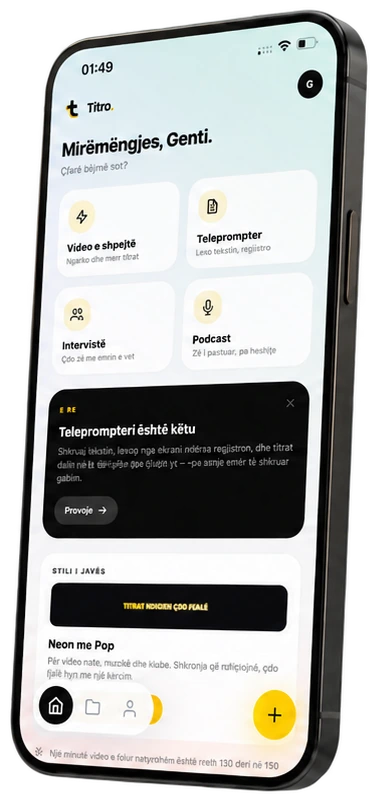
Where to find it
- 1+
- 2Choose from gallery
- 3Upload & caption
Step by step
Start a video
Tap + in the tab bar and pick Choose from gallery, or Open camera to film now. The cards on Home, Quick video, Interview and Podcast, start the same flow with the right presets.
Set the language
Under Video language pick the language you speak, or leave it on automatic. Titro captions Albanian, English, German, Italian, French and Turkish.
Choose the caption length
Caption length: Short shows 1–2 words at a time (TikTok style), Medium 3–4 words, Long up to about two lines.
Upload
Tap Upload & caption. The phone compresses the file first so the upload is quick. You can close the app: Titro sends a notification when the captions are ready.
Check and export
The video opens in the editor with every word timed. Fix a word if you need to, pick a style, then tap Export.
Open Titro Studio
Go to app.titro.live in the browser and sign in with the same account you use on the phone.
New project
Click New project, keep Video with subtitles selected and click Choose a video.
Pick the settings
Set Video language and Caption length. Tick Different speakers if more than one person talks.
Upload
Click Upload. Big files go up in pieces: if the connection drops, the upload continues where it stopped instead of starting over.
Get more out of it
Name the language
Automatic detection works, but picking the language yourself is the safest choice for very short clips and videos full of names.
Short captions for vertical video
Short (1–2 words) reads at feed speed on TikTok, Reels and Shorts. Long suits interviews and YouTube.
Wrong file? Cancel it
Cancel processing stops the job and gives the minutes back.
Good to know
- Your first video up to 3 minutes is free, with a small Titro watermark. Paid plans export without it.
- Video files up to 1.5 GB: MP4, MOV, M4V, MKV, WebM, AVI and 3GP.
- Each video gets captions in one language. To show them in another, use translation.
Keep going
Fix words, timing and layout
Correct a word, move a caption in time, split long lines, add free text and images: editing captions in the Titro app and in Titro Studio.
Caption styles, fonts and colours
Pick one of 15 caption styles, change font, size and highlight colour, place the captions and save your own look for every new video.
Export the video and the .srt
Save the captioned video in original quality, 1080p or 720p, share it to TikTok or Instagram, and download the .srt file for YouTube.